Fyndare API
Integrate your business systems with Fyndare. Create, manage, and sync listings programmatically.
Quick Start
- Create a business account at fyndare.se/register (select "Företag")
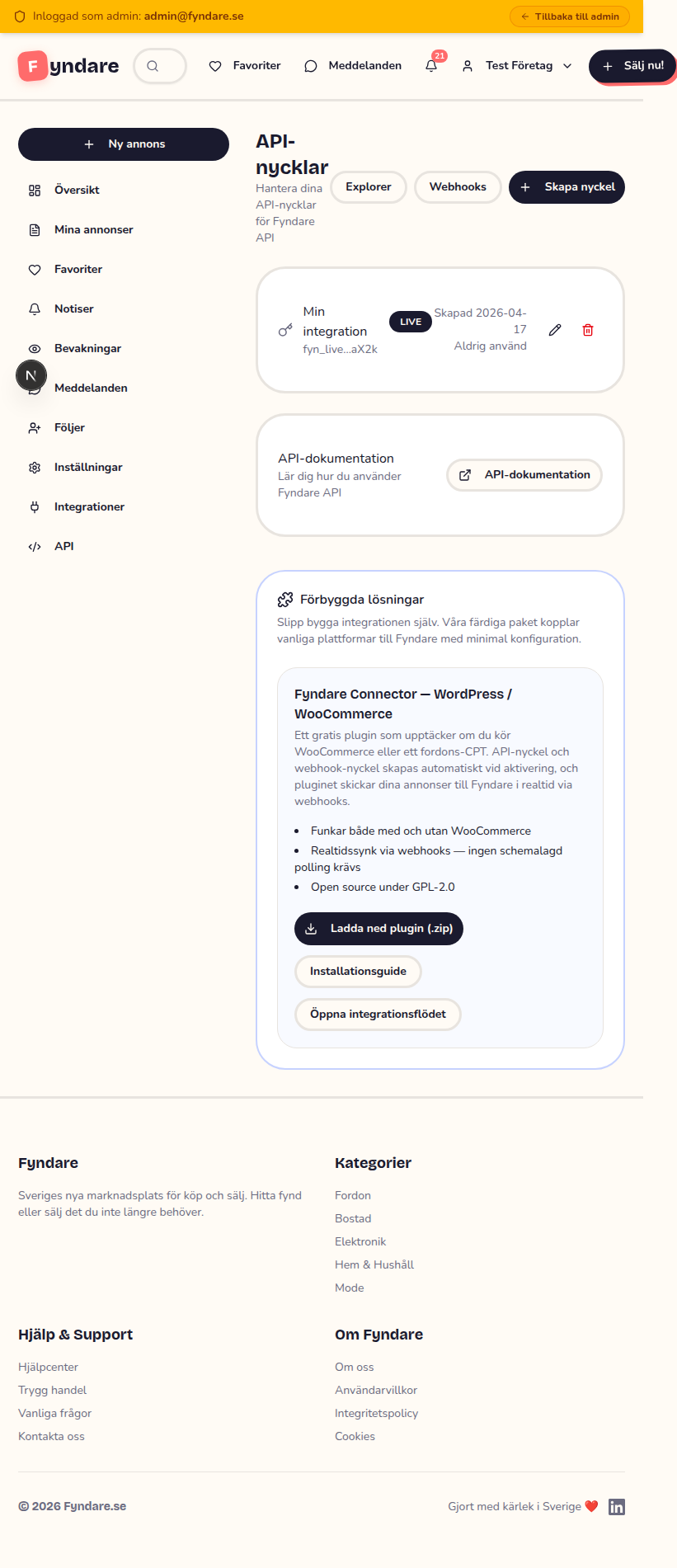
- Go to Dashboard → API and request API access
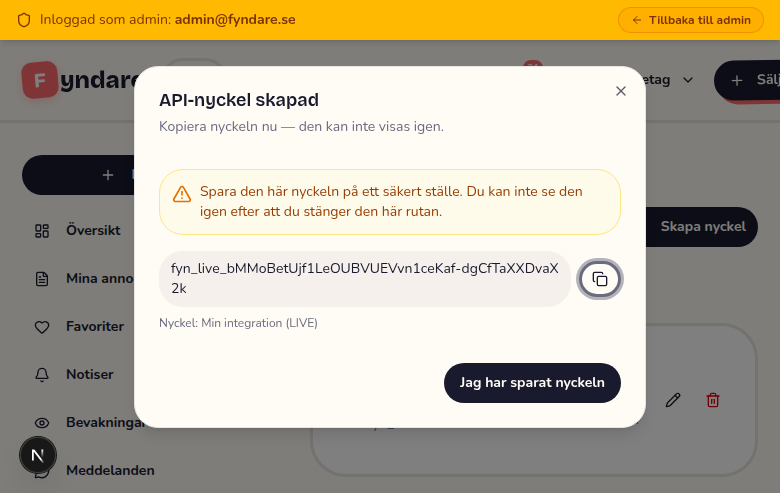
- Once approved, create an API key (the key is shown only once — save it!)
- Make your first request:
curl -H "Authorization: Bearer YOUR_API_KEY" \
https://fyndare.se/api/v1/meBase URL: https://fyndare.se/api/v1
Authentication
All API requests require a Bearer token in the Authorization header.
Authorization: Bearer fyn_live_abc123...Live Keys
fyn_live_*Creates real, publicly visible listings.
Test Keys
fyn_test_*Creates draft listings. Not visible publicly. Safe for testing.
API keys are hashed with SHA-256 and never stored in plaintext. A key is shown only once at creation. If lost, revoke the old key and create a new one.
Response Format
All responses use a consistent JSON envelope:
{
  "success": true,
  "data": { ... },
  "meta": {
    "requestId": "req_a1b2c3d4e5f6",
    "timestamp": "2026-02-15T14:30:00.000Z"
  }
}{
"success": true,
"data": [ ... ],
"pagination": {
"page": 1,
"limit": 20,
"total": 150,
"pages": 8,
"hasMore": true
},
"meta": { ... }
}{
"success": false,
"error": {
"code": "VALIDATION_ERROR",
"message": "Title must be at least 5 characters",
"details": [
{ "field": "title", "message": "Title must be at least 5 characters" }
]
},
"meta": { ... }
}Rate Limits
| Method | Limit | Window |
|---|---|---|
| GET | 300 requests | per minute |
| POST / PATCH / PUT / DELETE | 30 requests | per minute |
When rate limited, you receive a 429 response with a RATE_LIMITED error code. Wait and retry with exponential backoff.
Reference Data
Use these endpoints to discover valid category slugs and location slugs for creating listings. Cache them locally — they rarely change.
/categoriesList all categories with children and their attributes.
/locationsList all 21 Swedish län with their kommuner.
Listings
/listingsList your own listings. Supports pagination, status filter, and sorting.
page, limit (max 100), status, sort (newest|oldest|price_asc|price_desc), externalId/listingsCreate a new listing.
{
  "title": "Volvo V60 2019",
  "description": "Välskött familjebil med...",
  "price": 259000,
  "condition": "GOOD",
  "categorySlug": "fordon-bilar",
  "locationLan": "vastra-gotalands-lan",
  "locationKommun": "goteborg",
  "externalId": "INV-001",
  "phone": "+46701234567",
  "images": [
    { "url": "https://example.com/car1.jpg", "order": 0 },
    { "url": "https://example.com/car2.jpg", "order": 1 }
  ]
}Idempotency-Key header to prevent duplicate listings on network retries./listings/:idGet a single listing by ID.
/listings/:idPartial update. Only send the fields you want to change.
/listings/:idSoft-delete a listing (status set to REMOVED).
/listings/:id/soldMark a listing as sold. Only works on ACTIVE listings.
/listings/:id/renewRenew a listing (+30 days). Works on ACTIVE or EXPIRED listings.
Images
Images can be uploaded in three ways: URL fetch, multipart upload, or base64 inline. Max 30 images per listing.
`order` is a position, never a stored value. Stored order is always a dense 0–29 with no gaps and no duplicates, so the image at order 0 is unambiguously the primary image — the search thumbnail, the first gallery slide and the og:image. Whatever you send is resolved against the images that are already there, and the whole gallery is renumbered. Valid range is 0–29; anything else is rejected with 400.
/listings/:id/imagesAdd an image to a listing. Supports URL, multipart, or base64. `order` is a position REQUEST resolved against the existing images, not a value that gets stored — read the position back from the response instead of assuming it echoes your request. Ties resolve in favour of the existing image, so order 0 on a listing that already has images lands at position 1, NOT at the top; use the reorder endpoint to choose the primary image. Omit `order` to append at the end.
/listings/:id/images/:imageIdRemove an image from a listing.
/listings/:id/images/reorderReorder images. Pass EVERY image ID of the listing exactly once, in the desired order — a partial or duplicated list is rejected with 400, because a partial reorder would leave two images sharing a position and make the main image non-deterministic.
External ID / Upsert
The upsert pattern is the recommended way to sync your inventory. Use your own product ID as the externalId — Fyndare creates or updates automatically.
/listings/by-external-id/:externalIdIf a listing with this externalId exists for your account, update it. Otherwise, create a new one.
curl -X PUT https://fyndare.se/api/v1/listings/by-external-id/INV-001 \
  -H "Authorization: Bearer fyn_live_..." \
  -H "Content-Type: application/json" \
  -d '{
    "title": "Volvo V60 2019",
    "description": "Updated description...",
    "price": 249000,
    "condition": "GOOD",
    "categorySlug": "fordon-bilar",
    "locationLan": "vastra-gotalands-lan",
    "locationKommun": "goteborg"
}'Bulk Operations
Process up to 50 items per request. Partial success is supported — each item is processed independently.
/listings/bulkBulk create listings (max 50).
/listings/bulkBulk update listings by ID or externalId (max 50).
/listings/bulkBulk delete listings (max 50).
/listings/bulk/soldBulk mark listings as sold (max 50).
{
  "success": true,
  "data": {
    "total": 3,
    "created": 2,
    "failed": 1,
    "results": [
      { "index": 0, "success": true, "data": { "id": "clxx..." } },
      { "index": 1, "success": true, "data": { "id": "clxy..." } },
      { "index": 2, "success": false, "error": { "code": "VALIDATION_ERROR", "message": "Price is required" } }
    ]
  }
}Webhooks
Receive HTTP notifications when events happen. Max 5 webhook endpoints per account.
Supported Events
| Event | Trigger |
|---|---|
| listing.created | Listing created |
| listing.updated | Listing updated |
| listing.sold | Marked as sold |
| listing.expired | Listing expired |
| listing.removed | Admin removed listing |
| message.received | New message on your listing |
| listing.favorited | Someone favorited your listing |
/webhooksCreate a webhook endpoint. The secret is returned only once.
/webhooksList your webhook endpoints.
/webhooks/:idUpdate URL, events, or active status.
/webhooks/:idDelete a webhook endpoint.
/webhooks/:id/testSend a test webhook delivery.
/webhooks/:id/deliveriesView delivery history.
Webhook Payload
{
  "event": "listing.sold",
  "deliveryId": "del_abc123",
  "timestamp": "2026-02-15T14:30:00.000Z",
  "data": {
    "id": "clxx123",
    "externalId": "INV-001",
    "soldAt": "2026-02-15T14:30:00.000Z"
  }
}Headers included with every delivery:
X-Fyndare-Event: listing.sold
X-Fyndare-Delivery: del_abc123
X-Fyndare-Signature: sha256=abc123...
X-Fyndare-Timestamp: 1708012345Verifying Signatures
Verify the X-Fyndare-Signature header using HMAC-SHA256 with your webhook secret:
const crypto = require("crypto");

function verifyWebhook(secret, timestamp, body, signature) {
  const expected = crypto
    .createHmac("sha256", secret)
    .update(timestamp + "." + body)
    .digest("hex");
  return signature === "sha256=" + expected;
}

// In your handler:
const sig = req.headers["x-fyndare-signature"];
const ts = req.headers["x-fyndare-timestamp"];
const isValid = verifyWebhook(WEBHOOK_SECRET, ts, JSON.stringify(req.body), sig);import hmac, hashlib
def verify_webhook(secret, timestamp, body, signature):
message = f"{timestamp}.{body}"
expected = hmac.new(secret.encode(), message.encode(), hashlib.sha256).hexdigest()
return signature == f"sha256={expected}"Retry Policy
- 1st attempt: immediate
- Retry 1: after 5 minutes
- Retry 2: after 30 minutes
- Retry 3: after 2 hours
- After 10 consecutive failures: endpoint auto-disabled
Re-enable a disabled endpoint by updating it with isActive: true.
Error Reference
| Code | HTTP | Description |
|---|---|---|
| UNAUTHORIZED | 401 | Missing or invalid API key |
| FORBIDDEN | 403 | Valid key but insufficient scopes |
| NOT_FOUND | 404 | Resource not found |
| VALIDATION_ERROR | 400 | Invalid input (check details array) |
| RATE_LIMITED | 429 | Rate limit exceeded — wait and retry |
| SERVER_ERROR | 500 | Internal error — retry or contact support |
Code Examples
cURL — Create a listing
curl -X POST https://fyndare.se/api/v1/listings \
  -H "Authorization: Bearer fyn_live_..." \
  -H "Content-Type: application/json" \
  -H "Idempotency-Key: unique-key-123" \
  -d '{
    "title": "Volvo V60 2019",
    "description": "Välskött familjebil med full servicehistorik...",
    "price": 259000,
    "condition": "GOOD",
    "categorySlug": "fordon-bilar",
    "locationLan": "vastra-gotalands-lan",
    "locationKommun": "goteborg"
}'JavaScript / Node.js
const API_KEY = "fyn_live_...";
const BASE = "https://fyndare.se/api/v1";

async function createListing(data) {
  const res = await fetch(`${BASE}/listings`, {
    method: "POST",
    headers: {
      "Authorization": `Bearer ${API_KEY}`,
      "Content-Type": "application/json",
    },
    body: JSON.stringify(data),
  });
  return res.json();
}

// Create
const { data: listing } = await createListing({
  title: "Volvo V60 2019",
  description: "Välskött familjebil...",
  price: 259000,
  condition: "GOOD",
  categorySlug: "fordon-bilar",
  locationLan: "vastra-gotalands-lan",
  locationKommun: "goteborg",
});
console.log("Created:", listing.id);

// List
const res = await fetch(`${BASE}/listings?page=1&limit=10`, {
  headers: { "Authorization": `Bearer ${API_KEY}` },
});
const { data: listings } = await res.json();

// Mark as sold
await fetch(`${BASE}/listings/${listing.id}/sold`, {
  method: "POST",
  headers: { "Authorization": `Bearer ${API_KEY}` },
});Python
import requests

API_KEY = "fyn_live_..."
BASE = "https://fyndare.se/api/v1"
HEADERS = {
    "Authorization": f"Bearer {API_KEY}",
    "Content-Type": "application/json",
}

# Create listing
resp = requests.post(f"{BASE}/listings", headers=HEADERS, json={
    "title": "Volvo V60 2019",
    "description": "Välskött familjebil...",
    "price": 259000,
    "condition": "GOOD",
    "categorySlug": "fordon-bilar",
    "locationLan": "vastra-gotalands-lan",
    "locationKommun": "goteborg",
})
listing = resp.json()["data"]
print(f"Created: {listing['id']}")

# List
resp = requests.get(f"{BASE}/listings", headers=HEADERS)
listings = resp.json()["data"]

# Mark as sold
requests.post(f"{BASE}/listings/{listing['id']}/sold", headers=HEADERS)Inventory Sync Pattern
// Sync your full inventory using the upsert pattern
for (const item of inventory) {
  await fetch(
    `${BASE}/listings/by-external-id/${item.sku}`,
    {
      method: "PUT",
      headers: {
        "Authorization": `Bearer ${API_KEY}`,
        "Content-Type": "application/json",
      },
      body: JSON.stringify({
        title: item.name,
        description: item.description,
        price: item.price,
        condition: "NEW",
        categorySlug: item.category,
        locationLan: "vastra-gotalands-lan",
        locationKommun: "goteborg",
      }),
    }
  );
}

// Mark sold items
const soldIds = inventory
  .filter(i => i.sold)
  .map(i => i.fyndareId);

if (soldIds.length > 0) {
  await fetch(`${BASE}/listings/bulk/sold`, {
    method: "POST",
    headers: {
      "Authorization": `Bearer ${API_KEY}`,
      "Content-Type": "application/json",
    },
    body: JSON.stringify({ ids: soldIds }),
  });
}Account
/meGet your account info and API key details.
/me/usageGet API usage statistics for the current key.
days (1-90, default 30)Pre-made solutions
Don't want to build the integration from scratch? We ship ready-made packages that connect popular platforms to Fyndare with minimal configuration.
Fyndare Connector — WordPress / WooCommerce
A free WordPress plugin that detects whether you have WooCommerce products or a vehicle CPT and pushes your listings to Fyndare automatically. API key and webhook secret are generated on activation — no manual configuration required.
- Works with and without WooCommerce (WP vehicle CPTs supported)
- Real-time sync via webhooks — store changes mirrored on Fyndare within seconds
- Open source under GPL-2.0
- 15-minute scheduled polling as a safety net